
UI Manipulation Fraud: When Users Can No Longer Trust What They See
Fraudsters found a new way around established controls: UI manipulation fraud. By altering information displayed during legitimate banking sessions, attackers can influence customer decisions without compromising accounts. How can your bank prepare?
What Is UI Manipulation Fraud
UI manipulation fraud (also referred to as UI spoofing, UI tampering, or screen manipulation attacks) occurs when attackers alter or replace information displayed during a legitimate banking session, causing customers to authorize transactions based on false information.
Although browser and page tampering techniques have existed for decades, recent investigations into suspicious customer behavior and fraudulent transactions suggest they are evolving into a renewed threat for digital banking.
Across multiple cases, we have observed attackers manipulating what customers saw during online banking sessions, leading victims to make decisions based on information that appeared legitimate—but wasn’t. By targeting the customer’s perception rather than the transaction itself, these attacks create a significant challenge for fraud prevention teams.
How UI Manipulation Fraud Works
Unlike traditional account takeover techniques that focus on stealing credentials or compromising backend systems, UI manipulation fraud targets the customer’s perception in a way that closely resembles modern scam and authorized push payment (APP) fraud attacks.
These attacks typically begin with social engineering. Fraudsters contact their victims while posing as bank employees, IT support agents, investment advisors, or government representatives. Exploiting authority bias, they persuade victims to install malicious software (such as browser injections), grant remote access, or follow a series of instructions within online banking.
Once the victim is under attacker guidance, fraudsters manipulate the information displayed during the online banking session. Importantly, the legitimate banking website remains unchanged—the alteration happens only on the victim’s screen.
We observed multiple scenarios where attackers:
- Modified payment amounts displayed during authorization while submitting different values in the background
- Replaced account details or payee names to make fraudulent transfers appear legitimate
- Altered transaction summaries just before approval to hide destination accounts or suspicious payment references
- Manipulated account balances or payment statuses to create the false impression that transactions were cancelled, reversed, or unsuccessful
While malware or remote access tools are often part of the attack, the broader principle is not the malware itself—it’s tricking the users to take actions that look legitimate, but end in financial loss.
Inside a Typical UI Manipulation Case
The typical attack scenario can look like this:
A victim is contacted by a fake investment advisor and told to install a browser extension presented as an “investment helper” or portfolio management tool. The extension appears legitimate and claims to track returns, payouts, and portfolio performance.
Over time, the victim believes they are investing through the platform and regularly communicates with the representative. Eventually, they are told that an investment payout has already been processed and should now be visible in their bank account.
Unknown to the victim, the malicious extension actively manipulates content within the online banking session. When the victim logs in, it alters page elements in real time—changing visible account balances and transaction history directly in the browser.
The manipulated interface shows:
- An increased account balance
- A recent incoming transaction of $5,000 from an investment company
- Transaction history consistent with the higher balance
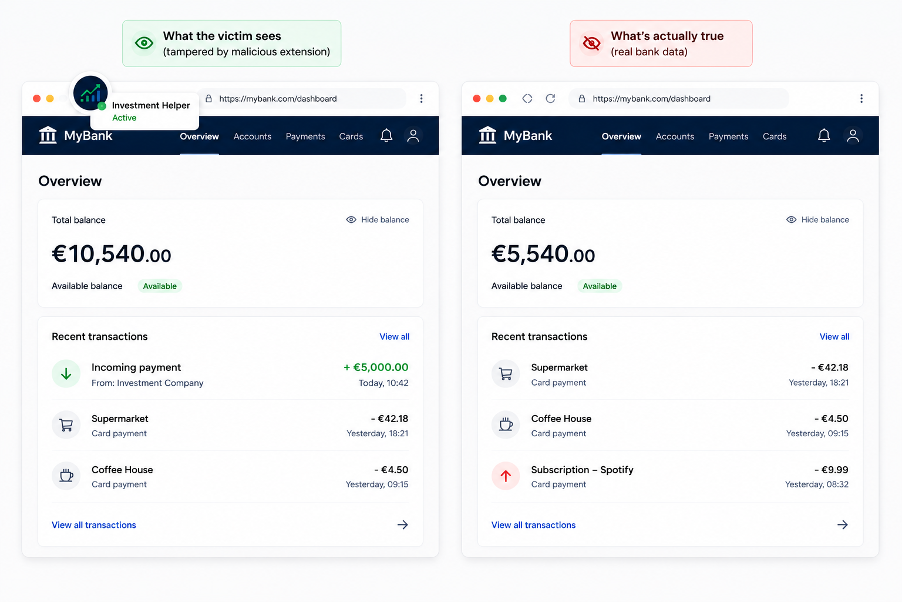
Because the victim sees both the increased balance and a matching incoming payment, they conclude the payout genuinely arrived.
Shortly after, the “advisor” contacts them again, claiming an accounting error: too much money was transferred. They ask for the excess amount to be returned immediately to avoid compliance or tax issues.
Since the victim can see the incoming payment and higher balance in their banking interface, the request appears legitimate. From their perspective, they are simply returning funds that clearly arrived.
When the victim initiates the transfer, all visible information supports the narrative:
- The falsified balance may remain visible
- Transaction history continues to support the scenario
- Recipient details or payment context match prior communication
Believing the transfer is legitimate, the victim authorizes the payment. Afterward, the browser extension may stop tampering with the banking page or revert the displayed values to normal. At that point, the victim discovers that the investment payout never existed and the transferred funds came entirely from their own account.
The UI manipulation attack is effective because victims are not tricked into performing actions they consider suspicious—they are guided into making a payment they genuinely believe is correct, based on information displayed inside their trusted banking environment.
The Visibility Gap
Your bank has probably already invested in account takeover (ATO) prevention, behavioral biometrics, and transaction monitoring. But what happens when the fraudster establishes a UI-manipulated session?
Traditional indicators associated with ATO are absent because the transaction originates from the legitimate account holder. The customer uses a trusted device, successfully authenticates, and willingly authorizes the payment.
This is what makes UI manipulation fraud particularly challenging to detect. It also highlights a familiar pattern in fraud prevention: as soon as one attack path becomes harder to exploit, fraudsters start looking for the next blind spot.
For fraud teams, responding quickly to emerging techniques is critical, especially as these schemes are likely to become more common. When reports of UI manipulation fraud started appearing across the banking sector, we rapidly analyzed the underlying techniques and enhanced our Behavioral Intelligence Platform with dedicated detection capabilities designed to identify unauthorized manipulation of displayed content within browser sessions.
Learn more about behavioral intelligence
How to Protect Your Customers
In-session visibility is important, but it’s only one opportunity to disrupt the attack. As always in manipulation-based fraud scenarios, awareness and education remain crucial. The best outcome is that the customer recognizes the scam and never proceeds in the first place. The earlier an attack is interrupted, the lower the risk.
Education should focus on helping users recognize suspicious behavior patterns (such as requests to share screens, install tools, enable remote access, or follow step-by-step instructions during banking sessions) as these are frequently abused in modern fraud scenarios.
Yet when scammers strike, the gap isn’t what people know, but what they do under pressure. Even when customers are educated about scam patterns, that knowledge can quickly disappear once scammers create urgency and exploit trust.
That’s why customers need not only information before an attack but also support at the moment it happens.
ThreatMark’s ScamFlag, for example, helps customers instantly verify suspicious messages, emails, advertisements, or requests directly within their banking app. By explaining why content looks fraudulent and highlighting the manipulation techniques involved, it gives customers the context they need to make informed decisions and spot similar scams in the future.
Protecting customers increasingly means understanding how decisions are being influenced and deploying tools that are made with modern fraud tactics in mind.
Related Articles
-
 May 6, 2026
Why Banking Malware is Still the Hardest Fraud Problem to Solve in Digital Banking
Banks still treat malware as a security issue to contain. In reality, it remains one of the biggest...
May 6, 2026
Why Banking Malware is Still the Hardest Fraud Problem to Solve in Digital Banking
Banks still treat malware as a security issue to contain. In reality, it remains one of the biggest...
-
 December 22, 2021
About S.O.V.A. Malware Family
Our SOC team has reverse-engineered the peculiar S.O.V.A malware family. In this article read about the uniqueness of...
December 22, 2021
About S.O.V.A. Malware Family
Our SOC team has reverse-engineered the peculiar S.O.V.A malware family. In this article read about the uniqueness of...
-
 May 27, 2021
On Mobile Banking Malware
Last week our SOC experts exposed FluBot – one of the most dangerous mobile banking malware currently in circulation.
Its...
May 27, 2021
On Mobile Banking Malware
Last week our SOC experts exposed FluBot – one of the most dangerous mobile banking malware currently in circulation.
Its...